はじめに
Pythonの標準ライブラリhttp.serverを使ったWebサーバーの構築とWebアプリケーションとデータベース(SQLite)を連携させる方法を解説します。
Webアプリとデータベースの連携
DBを利用しないアプリではデータをJSONファイルに保存していました。この方法はシンプルで学習には適していますが、実際のWebアプリケーションでは以下のような問題が生じます。
- 同時アクセス問題 : 複数のユーザーが同時にファイルに書き込もうとすると、データが破損する可能性がある。
- 検索・抽出の複雑さ : 特定の条件でデータを検索したり、複雑な集計を行うのが難しい。
- データの整合性 : 関連するデータ間の整合性を保つのが難しい。
- スケーラビリティ : データ量が増えるとパフォーマンスが著しく低下する。
これらの問題を解決するために、データベース管理システム(DBMS) を使用します。
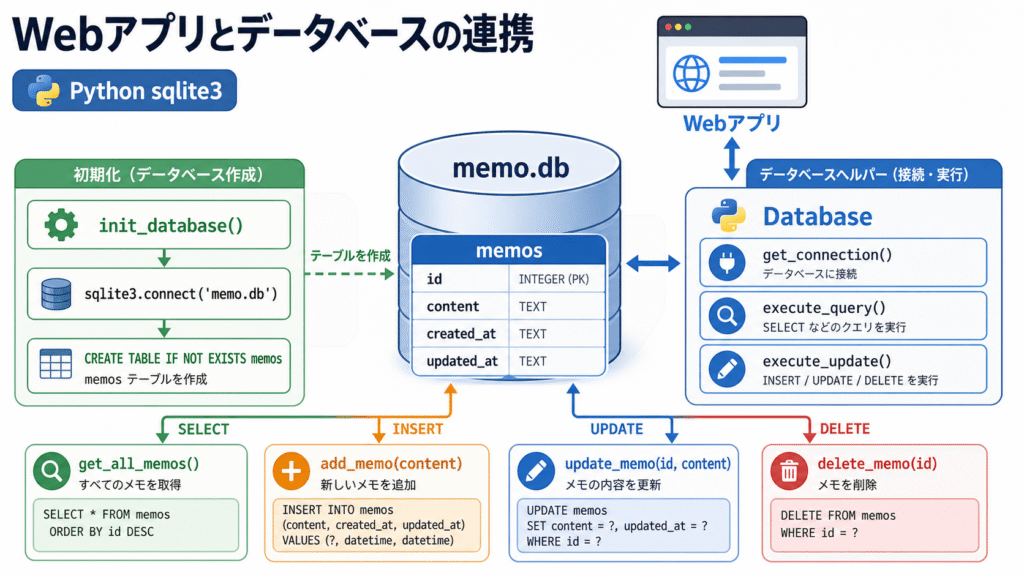
Pythonには標準でSQLiteがバンドルされており、追加のインストールなしで利用できるため、学習に最適です。
SQLiteの基本
SQLiteはサーバーレスの軽量なリレーショナルデータベースで、以下の特徴があります。
- 設定が不要で、ファイルベースで動作する
- Pythonの標準ライブラリに含まれている
- SQL(構造化クエリ言語)を使用してデータを操作する
- 小〜中規模のアプリケーションに適している
データベースの接続とテーブル作成
まずはデータベースに接続し、テーブルを作成する基本的なコードを見てみましょう。
import sqlite3

def init_database():
    """データベースを初期化し、テーブルを作成する"""
    # データベースに接続(ファイルが存在しない場合は新規作成)
    conn = sqlite3.connect('memo.db')
    cursor = conn.cursor()

    # メモテーブルを作成
    cursor.execute('''
        CREATE TABLE IF NOT EXISTS memos (
            id INTEGER PRIMARY KEY AUTOINCREMENT,
            content TEXT NOT NULL,
            created_at TIMESTAMP DEFAULT CURRENT_TIMESTAMP,
            updated_at TIMESTAMP DEFAULT CURRENT_TIMESTAMP
        )
    ''')

    # 変更を保存
    conn.commit()
    conn.close()
    print('✅ データベースの初期化が完了しました')

if __name__ == '__main__':
    init_database()
データベース操作用のヘルパー関数
Webアプリケーションからデータベースを操作しやすくするために、ヘルパー関数を作成します。
import sqlite3
from datetime import datetime

class Database:
    """データベース操作用のヘルパークラス"""

    @staticmethod
    def get_connection():
        """データベース接続を取得"""
        return sqlite3.connect('memo.db')

    @staticmethod
    def execute_query(query, params=None):
        """クエリを実行し、結果を返す(SELECT文用)"""
        conn = Database.get_connection()
        cursor = conn.cursor()
        if params:
            cursor.execute(query, params)
        else:
            cursor.execute(query)
        result = cursor.fetchall()
        conn.close()
        return result

    @staticmethod
    def execute_update(query, params=None):
        """更新クエリを実行(INSERT、UPDATE、DELETE文用)"""
        conn = Database.get_connection()
        cursor = conn.cursor()
        if params:
            cursor.execute(query, params)
        else:
            cursor.execute(query)
        last_id = cursor.lastrowid
        conn.commit()
        conn.close()
        return last_id

# データベース操作用の関数
def get_all_memos():
    """すべてのメモを取得(新しい順)"""
    query = '''
        SELECT id, content, created_at, updated_at
        FROM memos
        ORDER BY created_at DESC
    '''
    return Database.execute_query(query)

def add_memo(content):
    """新しいメモを追加"""
    query = 'INSERT INTO memos (content) VALUES (?)'
    return Database.execute_update(query, (content,))

def delete_memo(memo_id):
    """メモを削除"""
    query = 'DELETE FROM memos WHERE id = ?'
    Database.execute_update(query, (memo_id,))

def update_memo(memo_id, content):
    """メモを更新"""
    query = '''
        UPDATE memos
        SET content = ?, updated_at = CURRENT_TIMESTAMP
        WHERE id = ?
    '''
    Database.execute_update(query, (content, memo_id))
安全なデータベース操作の重要性
Webアプリケーションでデータベースを操作する際に最も重要なのが、SQLインジェクション対策です。SQLインジェクションとは、悪意のあるユーザーが入力にSQLコードを埋め込み、データベースを不正に操作する攻撃手法です。
危険な例(絶対にやらないでください)
# 危険!ユーザー入力を直接SQLに埋め込む
user_input = request.get('search')
query = f"SELECT * FROM memos WHERE content LIKE '%{user_input}%'"
# もし user_input が "'; DROP TABLE memos; --" だった場合...
安全な方法(パラメータ化クエリ)
# 安全:パラメータ化クエリを使用
user_input = request.get('search')
query = "SELECT * FROM memos WHERE content LIKE ?"
cursor.execute(query, (f'%{user_input}%',))
Webアプリケーションとの統合
それでは、これまでの知識を統合して、データベース連携機能を持ったメモ帳アプリケーションを完成させます。まずはディレクトリ構成です。ディレクトリとファイルの位置に注意して以下の内容を作成してください。
project/
│
├── server.py <- 手順1
│
├── database/
│   └── database.py <- 手順2
│
├── handlers/
│   └── http_handler.py <- 手順4
│
├── templates/
│   └── template_engine.py <- 手順3
│   └── index.html <- 手順5
│
├── static/
│   ├── style.css <- 手順6
│   └── script.js
│
└── memo.db
1サーバーファイルを作成
最初にメインのpythonサーバーファイル(server.py)を設定します。
from http.server import HTTPServer

from handlers.http_handler import MyHandler
from database.database import init_database


def run():
    """サーバーを起動"""
    # データベースを初期化
    init_database()

    server = HTTPServer(("localhost", 8000), MyHandler)

    print("🚀 データベース連携版メモ帳アプリを起動しました")
    print("📡 アドレス: http://localhost:8000")
    print("💾 データベース: memo.db")
    print("🔄 終了するには Ctrl+C を押してください")

    try:
        server.serve_forever()
    except KeyboardInterrupt:
        print("\n🛑 サーバーを停止しました")
        server.server_close()


if __name__ == "__main__":
    run()
2データベースファイルを作成
次にデータベース操作クラスdatabase.pyを定義します。
import sqlite3

class Database:
    """データベース操作クラス"""
    @staticmethod
    def get_connection():
        """データベース接続を取得"""
        return sqlite3.connect("memo.db")

    @staticmethod
    def execute_query(query, params=None):
        """SELECT文を実行"""
        conn = Database.get_connection()
        cursor = conn.cursor()
        if params:
            cursor.execute(query, params)
        else:
            cursor.execute(query)
        result = cursor.fetchall()
        conn.close()
        return result

    @staticmethod
    def execute_update(query, params=None):
        """INSERT・UPDATE・DELETE文を実行"""
        conn = Database.get_connection()
        cursor = conn.cursor()
        if params:
            cursor.execute(query, params)
        else:
            cursor.execute(query)
        last_id = cursor.lastrowid
        conn.commit()
        conn.close()
        return last_id

def init_database():
    """データベースを初期化"""
    conn = sqlite3.connect("memo.db")
    cursor = conn.cursor()
    cursor.execute("""
        CREATE TABLE IF NOT EXISTS memos (
            id INTEGER PRIMARY KEY AUTOINCREMENT,
            content TEXT NOT NULL,
            created_at TIMESTAMP DEFAULT CURRENT_TIMESTAMP,
            updated_at TIMESTAMP DEFAULT CURRENT_TIMESTAMP
        )
    """)
    conn.commit()
    conn.close()

def get_all_memos():
    """メモ一覧を取得"""
    query = """
        SELECT
            id,
            content,
            created_at
        FROM memos
        ORDER BY created_at DESC
    """
    return Database.execute_query(query)

def add_memo(content):
    """メモを追加"""
    query = """
        INSERT INTO memos (content)
        VALUES (?)
    """
    return Database.execute_update(query, (content,))

def delete_memo(memo_id):
    """メモを削除"""
    query = """
        DELETE FROM memos
        WHERE id = ?
    """
    Database.execute_update(query, (memo_id,))
3テンプレートエンジンファイルを作成
HTMLにてオブジェクトを表示するためのテンプレートエンジンファイル(template_engine.py)を定義します。
import os
import html

# template_engine.py の親ディレクトリを取得
BASE_DIR = os.path.dirname(os.path.dirname(os.path.abspath(__file__)))


def escape_html(text):
    """HTMLエスケープ"""
    return html.escape(str(text))


def render_template(filename, **kwargs):
    """テンプレートを読み込み、変数を置換してHTML文字列を返す"""

    filepath = os.path.join(BASE_DIR, "templates", filename)

    with open(filepath, "r", encoding="utf-8") as f:
        content = f.read()

    # {{ name }} を値へ置換
    for key, value in kwargs.items():
        content = content.replace(f"{{{{ {key} }}}}", str(value))

    return content
4リクエストハンドラーファイルを作成
HTTPハンドラー(http_handler.py)を定義します。
from http.server import BaseHTTPRequestHandler
from urllib.parse import urlparse, parse_qs

from database.database import (
    get_all_memos,
    add_memo,
    delete_memo,
)

from templates.template_engine import (
    render_template,
    escape_html,
)


class MyHandler(BaseHTTPRequestHandler):

    def do_GET(self):
        parsed_url = urlparse(self.path)
        path = parsed_url.path

        if path.startswith("/static/"):
            self.serve_static(path)
            return

        if path == "/":
            self.serve_index()

        elif path.startswith("/delete"):
            self.handle_delete(parsed_url)

        else:
            self.send_404()

    def do_POST(self):
        parsed_url = urlparse(self.path)
        path = parsed_url.path

        if path == "/":
            self.handle_add_memo()

        else:
            self.send_404()

    def serve_index(self):
        """メインページを表示"""

        memos = get_all_memos()

        memo_items = []

        for memo in memos:

            memo_items.append({
                "id": memo[0],
                "content": escape_html(memo[1]).replace("\n", "
"),
                "created_at": memo[2],
            })

        html = render_template(
            "index.html",
            memo_count=len(memos),
            memos=memo_items,
        )

        self.send_response(200)
        self.send_header(
            "Content-type",
            "text/html; charset=utf-8"
        )
        self.end_headers()
        self.wfile.write(html.encode("utf-8"))

    def handle_add_memo(self):
        """メモを追加"""

        content_length = int(
            self.headers.get("Content-Length", 0)
        )

        body = self.rfile.read(
            content_length
        ).decode("utf-8")

        params = parse_qs(body)

        content = params.get(
            "content",
            [""]
        )[0].strip()

        if content:
            add_memo(content)

        self.redirect("/")

    def handle_delete(self, parsed_url):
        """メモを削除"""

        params = parse_qs(parsed_url.query)

        memo_id = params.get(
            "id",
            [""]
        )[0]

        if memo_id.isdigit():
            delete_memo(int(memo_id))

        self.redirect("/")

    def serve_static(self, path):
        """静的ファイルを配信"""

        try:
            filepath = path.lstrip("/")

            with open(filepath, "rb") as file:
                content = file.read()

            if path.endswith(".css"):
                content_type = "text/css; charset=utf-8"

            elif path.endswith(".js"):
                content_type = "application/javascript; charset=utf-8"

            else:
                content_type = "application/octet-stream"

            self.send_response(200)
            self.send_header(
                "Content-type",
                content_type
            )
            self.end_headers()
            self.wfile.write(content)

        except FileNotFoundError:
            self.send_404()

    def redirect(self, path):
        """リダイレクト"""

        self.send_response(302)
        self.send_header(
            "Location",
            path
        )
        self.end_headers()

    def send_404(self):
        context = {
            "title": "404",
            "message": "ページが見つかりません"
        }

        html = render_template(
            "404.html",
            **context
        )

        self.send_response(404)
        self.send_header(
            "Content-type",
            "text/html; charset=utf-8"
        )
        self.end_headers()
        self.wfile.write(html.encode("utf-8"))
5HTMLファイルを作成
次はテンプレートです。
<!DOCTYPE html>
<html lang="ja">
<head>
    <meta charset="UTF-8">
    <title>データベース連携メモ帳</title>
    <link rel="stylesheet" href="/static/style.css">
</head>
<body>
    <div class="container">
        <h1>📝 データベース連携メモ帳</h1>
        <p class="memo-count">
            登録件数:{{ memo_count }} 件
        </p>
        <form method="POST" action="/">
            <textarea
                name="content"
                rows="5"
                placeholder="メモを入力してください"
                required
            ></textarea>
            <button type="submit">
                メモを追加
            </button>
        </form>
        <hr>
        <div class="memo-list">
            {% if memos %}
                {% for memo in memos %}
                <div class="memo-item">
                    <div class="memo-content">
                        {{ memo.content }}
                    </div>
                    <div class="memo-meta">
                        <span class="memo-date">
                            {{ memo.created_at }}
                        </span>
                        <a
                            href="/delete?id={{ memo.id }}"
                            class="delete-link"
                            onclick="return confirm('本当に削除しますか?')"
                        >
                            削除
                        </a>
                    </div>
                </div>
                {% endfor %}
            {% else %}
                <p class="no-memos">
                    メモがありません。最初のメモを追加してみましょう!
                </p>
            {% endif %}
        </div>
    </div>
    <script src="/static/script.js"></script>
</body>
</html>
6staticファイルの作成
CSS(static/style.css)やJS、Imageファイルなどをstaticフォルダに設定します。
* {
    margin: 0;
    padding: 0;
    box-sizing: border-box;
}

body {
    font-family: -apple-system, BlinkMacSystemFont, 'Segoe UI', Roboto, sans-serif;
    background: #f0f2f5;
    color: #333;
    line-height: 1.6;
    padding: 20px;
}

.container {
    max-width: 700px;
    margin: 0 auto;
}

header {
    display: flex;
    justify-content: space-between;
    align-items: center;
    margin-bottom: 30px;
}

h1 {
    font-size: 28px;
    color: #1a1a2e;
}

.badge {
    background: #16213e;
    color: white;
    padding: 4px 12px;
    border-radius: 20px;
    font-size: 14px;
}

.add-memo {
    background: white;
    padding: 20px;
    border-radius: 12px;
    box-shadow: 0 2px 8px rgba(0,0,0,0.08);
    margin-bottom: 30px;
}

textarea {
    width: 100%;
    padding: 12px;
    border: 2px solid #e0e0e0;
    border-radius: 8px;
    font-size: 16px;
    font-family: inherit;
    resize: vertical;
    transition: border-color 0.3s;
}

textarea:focus {
    outline: none;
    border-color: #4a90d9;
}

button {
    background: #4a90d9;
    color: white;
    border: none;
    padding: 10px 24px;
    border-radius: 8px;
    font-size: 16px;
    cursor: pointer;
    margin-top: 10px;
    transition: background 0.3s;
}

button:hover {
    background: #357abd;
}

.memo-item {
    background: white;
    padding: 16px 20px;
    border-radius: 12px;
    box-shadow: 0 2px 8px rgba(0,0,0,0.08);
    margin-bottom: 12px;
}

.memo-item:last-child {
    margin-bottom: 0;
}

.memo-content {
    font-size: 16px;
    white-space: pre-wrap;
    word-break: break-word;
}

.memo-meta {
    display: flex;
    justify-content: space-between;
    align-items: center;
    margin-top: 10px;
    padding-top: 10px;
    border-top: 1px solid #f0f0f0;
    font-size: 14px;
    color: #999;
}

.delete-link {
    color: #e74c3c;
    text-decoration: none;
    font-weight: 500;
}

.delete-link:hover {
    text-decoration: underline;
}

.no-memos {
    text-align: center;
    padding: 40px 20px;
    color: #999;
    font-size: 16px;
}
SQLiteの管理コマンド
データベースを直接確認したい場合は、以下のコマンドを使用します。
# SQLiteの対話モードを起動
sqlite3 memo.db

# テーブル一覧を表示
.tables

# テーブルのスキーマを表示
.schema memos

# すべてのデータを表示
SELECT * FROM memos;

# 終了
.quit
データベースを安全かつ効率的に利用するためには、いくつかの重要なポイントがあります。まず、SQLインジェクションを防ぐために、ユーザーが入力した値をSQL文へ直接埋め込むのではなく、必ずパラメータ化クエリを使用することが重要です。また、データベース接続は使用後に必ず conn.close() を実行して適切にクローズし、不要なリソース消費を防ぐ必要があります。
さらに、複数のデータベース操作をまとめて実行する場合は、BEGIN TRANSACTION と COMMIT を利用してトランザクションを適切に管理することで、データの整合性を保つことができます。データベース操作では例外が発生する可能性があるため、try-except を用いたエラーハンドリングを実装し、異常時にも適切に対応できるようにしておくことも重要です。
パフォーマンスの向上という観点では、頻繁に検索を行うカラムにインデックスを作成することで、検索速度を大幅に改善できます。また、万が一のデータ消失に備えて、データベースファイル(memo.db)を定期的にバックアップする習慣を身につけることも、安全なデータ運用には欠かせません。
まとめ
今回はPythonの標準ライブラリとSQLiteを使用して、Webアプリケーションとデータベースを連携させる方法を学びました。データベースを使用することで、アプリケーションのデータを永続化し、同時アクセスやデータの整合性といった問題に対処できるようになりました。また、パラメータ化クエリを使用したSQLインジェクション対策など、安全なデータベース操作のベストプラクティスも実装しました。これらの知識を基に、より本格的なWebアプリケーション開発に挑戦してみてください。