基本概念まとめ
1. 状態管理の基本概念
- ステート(State): アプリケーションの状態を保持する
- ゲッター(Getters): ステートから派生した値を計算
- ミューテーション(Mutations): ステートを同期的に更新
- アクション(Actions): 非同期処理を行い、ミューテーションをコミット
2. VuexとPiniaの比較
| 特徴 | Vuex | Pinia |
|---|---|---|
| 構成 | モジュールシステム | ストアごとに独立 |
| TypeScript | 部分的サポート | 完全サポート |
| サイズ | やや大きい | 軽量 |
| 学習曲線 | やや急 | 緩やか |
3. 基本データフロー
コンポーネント → (Dispatch) → アクション → (Commit) → ミューテーション → (Mutate) → ステート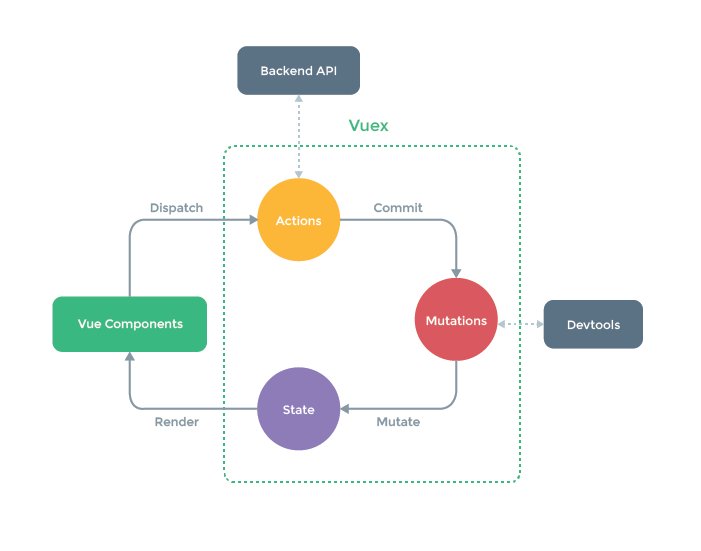
演習問題(全30問)
初級問題(9問)
ステート管理基礎
- Vuexストアの基本的な構成(state, getters, mutations, actions)を作成
- Piniaストアの基本的な構成(state, getters, actions)を作成
- コンポーネントからVuexステートを参照する方法
- コンポーネントからPiniaステートを参照する方法
ゲッター基礎
- 商品リストから高額商品(価格が10000円以上)をフィルタリングするゲッター
- ユーザーリストからフルネームを生成するゲッター
ミューテーション基礎
- カウンターを増加させるミューテーション
- タスクリストに新しいタスクを追加するミューテーション
アクション基礎
- APIからユーザーデータを取得するアクション(擬似コード)
中級問題(15問)
ステート管理応用
- Vuexモジュールを使用したストア分割
- Piniaで複数ストアを連携させる方法
- ローカルストレージと同期する永続化ストア
ゲッター応用
- 複数のゲッターを組み合わせた計算
- ゲッターに引数を渡す方法
- 動的にプロパティを取得するゲッター
ミューテーション応用
- ペイロードを使用したミューテーション
- オブジェクトの深いネストを更新するミューテーション
- 配列の特定要素を更新するミューテーション
アクション応用
- 複数のAPI呼び出しを順次実行するアクション
- 並列API呼び出しを処理するアクション
- アクション内で他のアクションを呼び出す
- エラーハンドリングを実装したアクション
Vuex/Pinia特有の機能
- Vuexのプラグインを作成(ロガー)
- Piniaのプラグインを作成(永続化)
- ストアのタイムトラベルデバッグ
上級問題(6問)
- 大規模アプリケーション向けストア設計
- サーバーサイドレンダリング対応ストア
- ストアのユニットテスト実装
- TypeScriptを活用した型安全なストア
- カスタムストアパターンの実装(Repositoryパターン)
解答例
初級解答(9問)
解答1: Vuex基本構成
import { createStore } from 'vuex'

export default createStore({
  state: {
    count: 0,
    todos: []
  },
  getters: {
    doneTodos: state => state.todos.filter(todo => todo.done)
  },
  mutations: {
    increment(state) {
      state.count++
    },
    addTodo(state, todo) {
      state.todos.push(todo)
    }
  },
  actions: {
    fetchTodo({ commit }, id) {
      // 非同期処理
      commit('addTodo', response.data)
    }
  }
})
解答2: Pinia基本構成
// stores/counter.js
import { defineStore } from 'pinia'

export const useCounterStore = defineStore('counter', {
  state: () => ({
    count: 0,
    todos: []
  }),
  getters: {
    doubleCount: (state) => state.count * 2,
    doneTodos: (state) => state.todos.filter(todo => todo.done)
  },
  actions: {
    increment() {
      this.count++
    },
    async addTodo(todo) {
      this.todos.push(todo)
    }
  }
})
解答3: Vuexステート参照
<template>
  <div>
    <p>カウント: {{ $store.state.count }}</p>
    <!-- モジュールの場合 -->
    <p>ユーザー: {{ $store.state.user.name }}</p>
  </div>
</template>

<script>
export default {
  computed: {
    count() {
      return this.$store.state.count
    }
  }
}
</script>
解答4: Piniaステート参照
<template>
  <div>
    <p>カウント: {{ counter.count }}</p>
    <p>2倍: {{ counter.doubleCount }}</p>
  </div>
</template>

<script setup>
import { useCounterStore } from '@/stores/counter'
const counter = useCounterStore()
</script>
解答5: 高額商品ゲッター
// Vuex
getters: {
  expensiveProducts: state => state.products.filter(p => p.price >= 10000)
}

// Pinia
export const useProductStore = defineStore('products', {
  state: () => ({
    products: []
  }),
  getters: {
    expensiveProducts: (state) => state.products.filter(p => p.price >= 10000)
  }
})
解答6: フルネームゲッター
// Vuex
getters: {
  fullNames: state => {
    return state.users.map(user => `${user.lastName} ${user.firstName}`)
  }
}

// Pinia
getters: {
  fullNames() {
    return this.users.map(user => `${user.lastName} ${user.firstName}`)
  }
}
解答7: カウンターミューテーション
// Vuex
mutations: {
  increment(state, payload = 1) {
    state.count += payload
  }
}

// コンポーネントでの呼び出し
this.$store.commit('increment', 5)
解答8: タスク追加ミューテーション
// Vuex
mutations: {
  addTask(state, newTask) {
    if (!newTask.title) return
    state.tasks.push({
      id: Date.now(),
      title: newTask.title,
      completed: false
    })
  }
}
解答9: API取得アクション
// Vuex
actions: {
  async fetchUsers({ commit }) {
    try {
      const response = await axios.get('/api/users')
      commit('setUsers', response.data)
    } catch (error) {
      console.error(error)
    }
  }
}

// Pinia
actions: {
  async fetchUsers() {
    try {
      this.users = await axios.get('/api/users').data
    } catch (error) {
      console.error(error)
    }
  }
}
中級解答(16問)
解答10: Vuexモジュール
// userModule.js
export default {
  namespaced: true,
  state: () => ({
    user: null
  }),
  mutations: {
    setUser(state, user) {
      state.user = user
    }
  }
}

// store/index.js
import userModule from './userModule'

export default createStore({
  modules: {
    user: userModule
  }
})
解答11: Piniaストア連携
// stores/user.js
import { defineStore } from 'pinia'
import { useAuthStore } from './auth'

export const useUserStore = defineStore('user', {
  state: () => ({
    profile: null
  }),
  actions: {
    async fetchProfile() {
      const auth = useAuthStore()
      if (!auth.isLoggedIn) return

      this.profile = await fetchUserProfile(auth.userId)
    }
  }
})
解答12: 永続化ストア
// Vuexプラグイン
const localStoragePlugin = store => {
  store.subscribe((mutation, state) => {
    localStorage.setItem('vuex-state', JSON.stringify(state))
  })
}

// 初期状態読み込み
const savedState = localStorage.getItem('vuex-state')
const store = createStore({
  state: savedState ? JSON.parse(savedState) : initialState,
  plugins: [localStoragePlugin]
})
解答13: 複数ゲッター組み合わせ
// Pinia
getters: {
  activeHighPriorityTodos() {
    const active = this.activeTodos // 他のゲッターを呼び出し
    return active.filter(todo => todo.priority === 'high')
  },
  activeTodos() {
    return this.todos.filter(todo => !todo.completed)
  }
}
解答14: 引数付きゲッター
// Vuex
getters: {
  getTodoById: state => id => {
    return state.todos.find(todo => todo.id === id)
  }
}

// 使用例
this.$store.getters.getTodoById(123)
解答15: 動的プロパティ取得
// Pinia
getters: {
  getItemByKey: state => (key, value) => {
    return state.items.find(item => item[key] === value)
  }
}

// 使用例
const user = userStore.getItemByKey('email', 'test@example.com')
解答16: ペイロード使用ミューテーション
mutations: {
  updateUser(state, payload) {
    const { id, data } = payload
    const user = state.users.find(u => u.id === id)
    if (user) {
      Object.assign(user, data)
    }
  }
}
解答17: ネストオブジェクト更新
// Vuex
mutations: {
  updateNestedProp(state, { path, value }) {
    const keys = path.split('.')
    const lastKey = keys.pop()
    const target = keys.reduce((obj, key) => obj[key], state)
    Vue.set(target, lastKey, value)
  }
}
解答18: 配列要素更新
mutations: {
  updateArrayItem(state, { index, newItem }) {
    Vue.set(state.items, index, { ...state.items[index], ...newItem })
  }
}
解答19: 順次API呼び出し
actions: {
  async fetchDataSequentially({ commit }) {
    await commit('setLoading', true)
    const user = await fetchUser()
    commit('setUser', user)
    const posts = await fetchPosts(user.id)
    commit('setPosts', posts)
    commit('setLoading', false)
  }
}
解答20: 並列API呼び出し
actions: {
  async fetchAllData({ commit }) {
    const [users, posts] = await Promise.all([
      fetchUsers(),
      fetchPosts()
    ])
    commit('setUsers', users)
    commit('setPosts', posts)
  }
}
解答21: アクション内アクション呼び出し
actions: {
  async initializeApp({ dispatch }) {
    await dispatch('fetchUser')
    await dispatch('fetchSettings')
    dispatch('loadPreferences')
  }
}
解答22: エラーハンドリング
actions: {
  async fetchData({ commit }) {
    try {
      commit('setLoading', true)
      const data = await api.fetchData()
      commit('setData', data)
      return data
    } catch (error) {
      commit('setError', error.message)
      throw error
    } finally {
      commit('setLoading', false)
    }
  }
}
解答23: Vuexロガープラグイン
const loggerPlugin = store => {
  store.subscribe((mutation, state) => {
    console.log('Mutation:', mutation.type)
    console.log('Payload:', mutation.payload)
    console.log('Next State:', state)
  })
}

const store = createStore({
  // ...
  plugins: [loggerPlugin]
})
解答24: Pinia永続化プラグイン
const piniaPersist = ({ store }) => {
  const key = `pinia-${store.$id}`
  const savedState = localStorage.getItem(key)
  if (savedState) {
    store.$patch(JSON.parse(savedState))
  }
  store.$subscribe((mutation, state) => {
    localStorage.setItem(key, JSON.stringify(state))
  })
}

const pinia = createPinia()
pinia.use(piniaPersist)
解答25: タイムトラベルデバッグ
// Vuex
const store = createStore({
  // ...
  plugins: [createLogger()]
})

// Pinia (デバッグ用)
import { PiniaUndo } from 'pinia-undo'

const pinia = createPinia()
pinia.use(PiniaUndo)
上級解答(5問)
解答26: 大規模ストア設計
// stores/
//   ├── auth/
//   ├── products/
//   ├── cart/
//   └── index.js

// stores/products/state.js
export default () => ({
  items: [],
  currentProduct: null,
  loading: false
})

// stores/products/actions.js
export const actions = {
  async loadProducts({ commit }) {
    commit('SET_LOADING', true)
    const products = await api.fetchProducts()
    commit('SET_ITEMS', products)
    commit('SET_LOADING', false)
  }
}
解答27: SSR対応ストア
// Nuxt.jsのVuexストア例
// store/index.js
export const state = () => ({
  loadedData: null
})

export const actions = {
  async nuxtServerInit({ commit }, { req }) {
    const data = await fetchInitialData(req)
    commit('SET_DATA', data)
  }
}

// Pinia SSR例
export default defineNuxtPlugin((nuxtApp) => {
  nuxtApp.hook('app:created', async () => {
    const store = useStore()
    await store.fetchServerData()
  })
})
解答28: ストアのテスト
// Vuexストアのテスト例
import store from '@/store'

describe('counter store', () => {
  beforeEach(() => {
    store.commit('reset')
  })

  it('increments count', () => {
    store.commit('increment')
    expect(store.state.count).toBe(1)
  })

  it('async action', async () => {
    await store.dispatch('fetchData')
    expect(store.state.data).not.toBeNull()
  })
})

// Piniaテスト例
import { useCounterStore } from '@/stores/counter'
import { setActivePinia, createPinia } from 'pinia'

describe('Counter Store', () => {
  beforeEach(() => {
    setActivePinia(createPinia())
  })

  it('increments', () => {
    const counter = useCounterStore()
    counter.increment()
    expect(counter.count).toBe(1)
  })
})
解答29: TypeScriptストア
interface UserState {
  users: User[]
  currentUser: User | null
  loading: boolean
}

export const useUserStore = defineStore('user', {
  state: (): UserState => ({
    users: [],
    currentUser: null,
    loading: false
  }),
  getters: {
    activeUsers: (state) => state.users.filter(u => u.isActive)
  },
  actions: {
    async fetchUsers(): Promise {
      this.loading = true
      try {
        this.users = await userService.getAll()
      } finally {
        this.loading = false
      }
    }
  }
})
解答30: Repositoryパターン
// repositories/ProductRepository.js
export default {
  async getAll() {
    const response = await axios.get('/products')
    return response.data
  },
  async getById(id) {
    const response = await axios.get(`/products/${id}`)
    return response.data
  }
}

// store/modules/products.js
import ProductRepository from '@/repositories/ProductRepository'

const actions = {
  async loadProducts({ commit }) {
    const products = await ProductRepository.getAll()
    commit('SET_PRODUCTS', products)
  }
}
この演習セットは、Vuex/Piniaの状態管理を体系的に学ぶために設計されています。初級問題で基本概念を理解し、中級問題で実践的なスキルを習得し、上級問題でプロダクションレベルの設計パターンを学べる構成になっています。各解答には実際のプロジェクトで活用できる実用的なコード例を示しており、状態管理のベストプラクティスを習得するのに役立ちます。